
AutoEmbed Browse Movies, Series & Anime Free
AutoEmbed might be the smartest free streaming tool, One app that doubles as a massive content library and an OTT discovery engine — browse any movie, series, or anime title, see exactly which platform streams it, and watch it right inside the app. No subscriptions, no sign-ups, no waiting.
50k+
Movies & Shows
2.4M+
Active Users
4.8★
User Rating
0$
Completely Free
What is AutoEmbed?

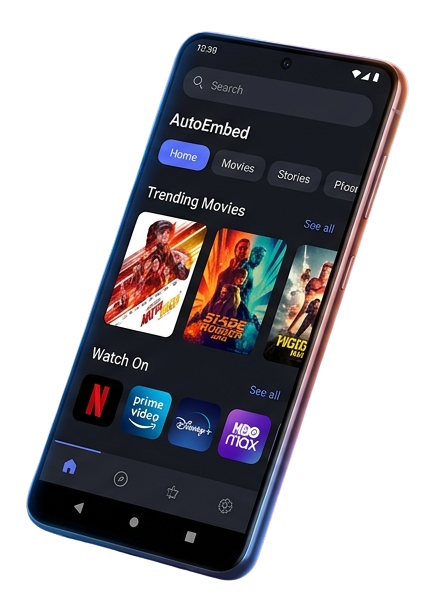
AutoEmbed Apk is a free Android app that works like a movie and TV show database with streaming baked in. You browse a library of titles — latest movies, full series, anime — and for each one, a “Watch On” section shows which OTT platforms carry it. Don’t want to jump to another app? A built-in player lets you watch directly inside AutoEmbed itself. Version 1.0.4 is the current build (some mirrors list 1.0.5), sitting at roughly 24 MB. Runs on Android 6.0 and up, no account needed.
Features You’ll Love Using
Engineered for the ultimate viewing experience — fast, smooth, and endlessly entertaining.
Content Library
AutoEmbed presents itself as a browsing hub with categories spanning genres like action, horror, comedy, romance, thriller, and more. The library includes recent theatrical releases, ongoing TV series, and a separate anime section — which is a nice touch since many competing APKs lump anime in with everything else.
The “Watch On” Feature
This is probably AutoEmbed’s most interesting addition. Every title includes a “Watch On” section listing official OTT platforms where it’s available — Netflix, Amazon Prime, Hulu, Disney+, and others depending on your region. Instead of opening five different apps to figure out where a specific movie lives, you check this list and jump straight to the right platform. For people who only care about finding where content is streaming, this tool alone makes the app worth keeping around.
Built-In Player
AutoEmbed doesn’t just point you elsewhere — it includes its own video player. Tap a title, and if a source is available, you can watch right inside the app without switching platforms.
Player is bare-bones: play, pause, seek bar, basic quality options. No picture-in-picture, no casting, no offline downloads.
Search and Browsing
Search is responsive. Type a title, results pop up almost immediately. Filtering by genre and year helps when multiple versions of a title exist. Layout stays simple — large thumbnails, clear text, no clutter.
Title Detail Pages
Each listing gets a detail page with ratings, release year, genre tags, a short synopsis, Cast and crew, reviews, and the “Watch On” platform list. Series break into seasons and episodes. Enough context to decide before you commit.
Get AutoEmbed APK
Download the latest version and start streaming instantly.
Ready to Start Streaming?
Download AutoEmbed APK now and unlock unlimited access to your favorite movies, shows, and live content — all for free.
App Details
|
Version |
1.0.4 |
|
Size |
24 MB |
|
Android |
6.0+ |
|
Updated |
Mar 2026 |
|
Downloads |
8757644+ |
Pros & Cons
Every app has its strengths and trade-offs. Here’s a transparent look at what AutoEmbed offers.
What works well
The “Watch On” discovery tool is the strongest thing about this app. It saved us real time — we stopped bouncing between Netflix, Prime, and Hulu trying to find where a movie was streaming. One quick check inside AutoEmbed, and we had our answer. If the app did nothing else, this alone would justify the install.
Speed impressed us too. Searches returned results almost instantly on our Pixel 7, and the whole app felt smooth — pages loaded in under two seconds, even on our Redmi Note 12 Pro. Battery drain stayed reasonable at about 12% over a two-hour session. And the app never crashed during our entire testing period. Not once. For a sideloaded APK, that kind of stability is uncommon.
Anime browsing also deserves a mention — separate from the main movie and series tabs, with its own dedicated section. Welcome addition if you follow seasonal releases.
What frustrated us — and this is the big one
Most movies listed in AutoEmbed’s library simply aren’t available through the built-in player. You’ll browse the catalog, get excited about a recent release, tap on it, and… nothing plays. Title exists, detail page loads fine, but the actual stream? Not there.
This is the app’s most serious problem. During our testing, we’d estimate more than half the movies we tried were unavailable through the in-app player. You scroll through rows thinking you’ve found a goldmine, only to hit empty listing after empty listing.
“Watch On” partially saves this — at least you can redirect to an official platform that does carry the movie. But if you came expecting to watch everything inside the app for free, brace yourself.
Other annoyances: no download option, no watchlist, and no viewing history. Every session starts from scratch. Close the app halfway through a series and you’re scrolling back to find your episode manually.
How to Download & Install?
Follow these simple steps to get AutoEmbed up and running on your Android device in minutes.
1
Enable Unknown Sources
Go to your Android device Settings → Security → toggle on “Unknown Sources” or “Install from Unknown Apps” to allow APK installations.
2
Download the APK File
Click the download button above to get the latest AutoEmbed APK file. The download will begin automatically and save to your Downloads folder.
3
Locate & Open the File
Open your file manager and navigate to the Downloads folder. Tap on the AutoEmbed APK file to begin the installation process.
4
Install the Application
Tap “Install” when prompted. Wait for the installation to complete — it usually takes just a few seconds depending on your device.
5
Launch & Enjoy
Open AutoEmbed from your app drawer. Browse the library, pick your favorite content, and start streaming immediately — no sign-up required!
Should You Install AutoEmbed APK?
AutoEmbed APK is two apps fighting inside one shell. The “Watch On” discovery tool works well — a fast way to figure out which platform has the movie you want, without opening half a dozen apps. If that’s all you need, it earns a spot on your phone.
But the streaming side is a letdown. The content library looks stacked on the surface, yet most movies don’t actually play through the built-in player. That gap between what’s listed and what’s watchable is the app’s defining weakness. Like a restaurant with a twenty-page menu where half the dishes are “currently unavailable.”
Our recommendation: install it as a streaming guide, not a streaming app. Use “Watch On” to track down where titles live across your existing subscriptions. Don’t count on the in-app player as your primary way to watch — you’ll spend more time hitting dead ends than viewing content. It’s a solid lookup tool with a broken player bolted on. Worth keeping for the discovery side, but check your expectations at the door.